
Stop Cue
Stop cues allow a targeted cue to be stopped, with a fade out, when triggered. This cue has no effect if it’s triggered when the targeted cue isn’t playing.
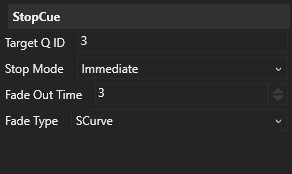
Target Q ID
Section titled “Target Q ID”The QID of the cue to be stopped when this cue is triggered.
Stop Mode
Section titled “Stop Mode”Specifies when the targeted cue should be stopped. This can be:
- Immediate — The cue will be stopped (with a fade out) as soon as this cue is triggered.
- LoopEnd — For cues which are looping, this waits until the current loop has finished before stopping the cue. This effectively de-vamps the targeted cue.
Fade Out Time
Section titled “Fade Out Time”Specifies the fade out time to use when stopping the targeted cue. The fade out time is specified in seconds.
This fade out time overrides the fade out time of the targeted cue.
Fade Type
Section titled “Fade Type”This specifies the shape of the curve used to fade out the cue. The following fade curves are available:
- Linear — a simple linear fade.
- SCurve — an S shaped fade, with a slow start and slow end. (Implemented as a quadaratic hermite spline)
- Square — a square-law fade, with a slow start and fast end.
- InverseSquare — an inverse square-law fade, with a fast start and a slow end.